
If you only use the internet in a motorhome to check the weather and look up the occasional campsite, a phone hotspot will usually do the job. But once you need to work regularly, join video calls or send larger files, you start thinking about connection reliability in a completely different way.
Mobile internet can be excellent in one spot and practically unusable a few kilometres down the road. Starlink needs a clear view of the sky and will obviously drop out in a tunnel or under trees. I didn't want to bet everything on one technology.
So in the end I combined Starlink, a 5G Teltonika RUTX50 router and two SIM cards from different operators. What matters here isn't just having three ways to get online. The real benefit is that the router switches between them automatically.
Starlink first, then T-Mobile and Vodafone
Starlink is my main link and has the highest priority in the failover settings. Next comes SIM 1 with T-Mobile, and the last fallback in the router is SIM 2 with Vodafone.
The router keeps checking whether each connection is alive. When Starlink loses its link, T-Mobile takes over the traffic. A tunnel is the textbook example: the satellite connection has no chance there, but there may well be mobile signal inside. The switch happens very quickly and I don't have to set anything manually.
Exactly how long the changeover takes depends on how often the router checks the link. In my case it comes out at milliseconds. I tried it with a YouTube video playing and the switch from Starlink to SIM 1 was not noticeable at all — the video kept playing smoothly, even though the public IP address had changed in the meantime.
The laptop, the phone and the TV are all connected to a single Wi-Fi network broadcast by the router. Where the internet happens to be coming from — Starlink, T-Mobile or Vodafone — is of no interest to them whatsoever. The RUTX50 handles the whole changeover on its side, so there is nothing to set up on the end devices.
As soon as Starlink starts working again, the router can go back to it on its own. So I don't have to watch which link is currently carrying the traffic, or switch anything back after coming out of a tunnel.
Why my SIM cards are from two operators
The obvious thing would be to put two cards from the same operator in both slots, but that wouldn't get me very far. When T-Mobile has weak coverage or an outage in a particular area, a second card on the same network isn't going to save the day.
That's why SIM 1 is T-Mobile and SIM 2 is Vodafone. I don't normally use the Vodafone card at all and it stays there as the last resort. But there are places where one operator has almost no signal and the other works perfectly. That's exactly where the second SIM earns its keep.
It makes even more sense when travelling around Europe. T-Mobile and Vodafone can have different roaming partners abroad. So when the network available to one Czech SIM isn't performing, the other card can register with a different local operator. It's not just another SIM "just in case" — it's a genuine route onto a different network.
The point of the second SIM isn't that you have two cards. It's that you have access to two independent radio networks with different coverage, and abroad with different roaming partners too. Two cards from one operator don't give you that — they both go down together.
Where I mounted the router
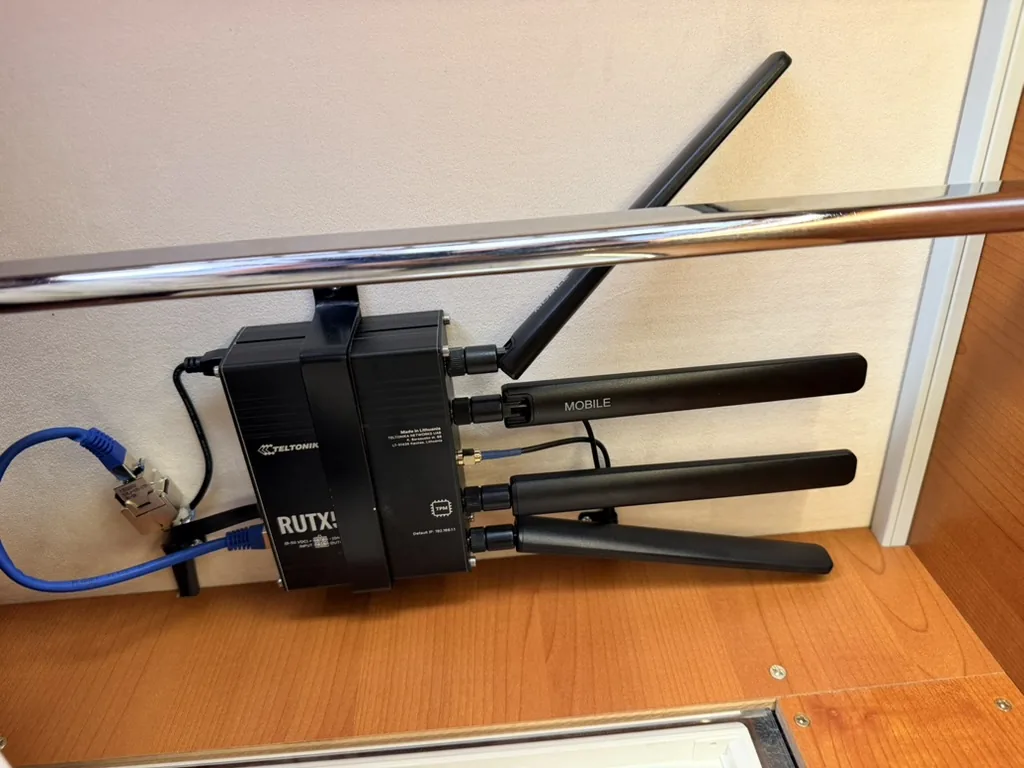
I mounted the Teltonika in the top of a cabinet near the electrical panel. It's out of the way there, close to the 12V distribution, and I didn't have to run long power cables halfway across the motorhome.
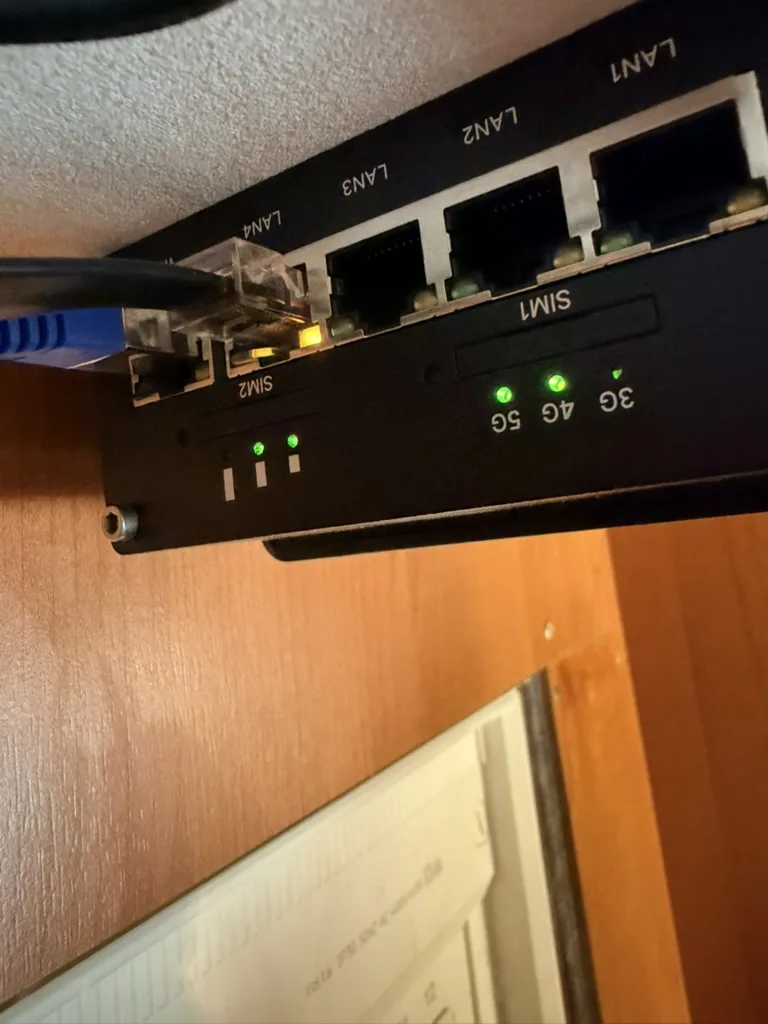
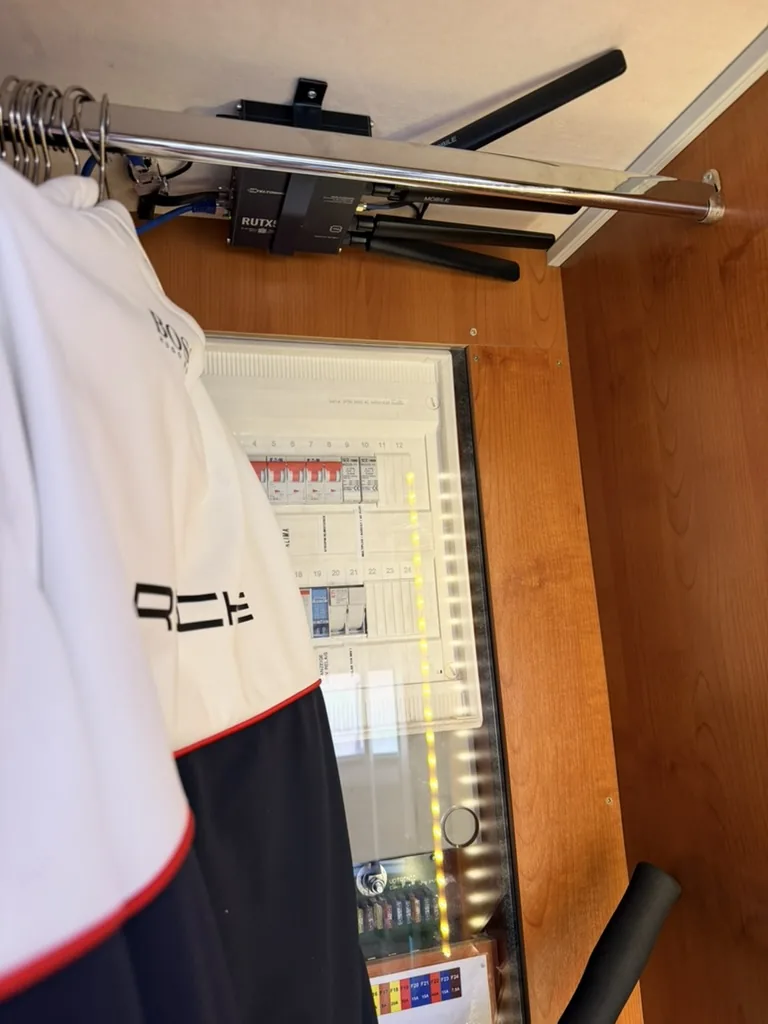
The router is fixed in place so it can't move around while driving. At the same time I can still reach it reasonably easily when I need to check cables, SIM cards or the status LEDs.
When mounting it I tried to leave the antennas as much space as possible. You also have to make sure the router doesn't end up buried under clothes later on. The electronics need airflow, and things stored in the cabinet shouldn't press on the connectors or move the antennas.
Mounting the router inside the motorhome is practical, but the bodywork attenuates the signal. The router can show 5G and the connection still won't be fast. The 5G icon and the number of bars don't tell the whole story.
Far more useful than the bars are three values the router shows in its admin interface:
| Value | What it shows | Why it matters |
|---|---|---|
| RSRP | received signal strength | Tells you how strongly the signal arrives — but nothing about how clean it is. |
| RSRQ | signal quality | Also accounts for interference and cell load. |
| SINR | signal to noise and interference ratio | The best predictor of real-world speed. Low SINR = slow connection even with full bars. |
If tuning the settings still didn't get me a usable result, the next step would be an external 4G/5G antenna on the roof, which moves reception outside the motorhome's metal shell. But first I wanted to see what the current installation could manage.
The router runs straight off 12 V
The RUTX50 is wired directly into the motorhome's 12V system. It made no sense to me to fire up the inverter for a router, generate 230 V from the battery and then step the voltage back down with a mains adapter.
Direct power means fewer losses, fewer adapters and, above all, the option of running the router off the leisure battery away from campsites. The supply branch has its own suitably rated fuse, of course.
With an installation like this it's worth remembering that "12 V in a vehicle" isn't exactly 12.0 V under all circumstances. The voltage moves with the state of the battery and with whether it's currently charging. The equipment, the wiring and the fusing all have to match the real conditions in the onboard system, not just the number printed on the socket.
Why I looked into TTL
While testing I ran into an odd difference. The same SIM card was faster in a phone than it was once I put it in the router. One possible explanation was that the operator recognised traffic coming through a router and treated it differently.
TTL, or Time To Live, is a field in the IP packet that usually decreases as the packet passes through a router. That different value can hint to the network that the traffic isn't coming from the phone itself but from another device behind a router.
So I changed the TTL rule on the RUTX50. After saving, a green "Configuration has been applied" message appeared in the admin interface, so it was clear the new setting was live.
That's not the end of the test, though. You need to reboot the router, or at least turn the mobile connection off and on again. Only then do new connections get established with the current setting.
Mobile network speed fluctuates with how busy the cell happens to be. Only several measurements on the same device, in the same place, comparing download, upload and latency, tell you anything.
Reading the result is then straightforward: if the speed rises noticeably after the change, the original limit may have had something to do with how the network was identifying traffic from the router. If it stays at roughly 30 Mbit/s, a weak or noisy signal inside the motorhome is a far more likely cause.
The TTL setting won't have the same effect on every tariff and every operator. You also need to stay within the terms of the particular service.
Starlink on the roof window
Starlink is my main connection, so I needed a simple way to position it with a good view of the sky. I put the antenna in a removable suction-cup mount on the roof window.
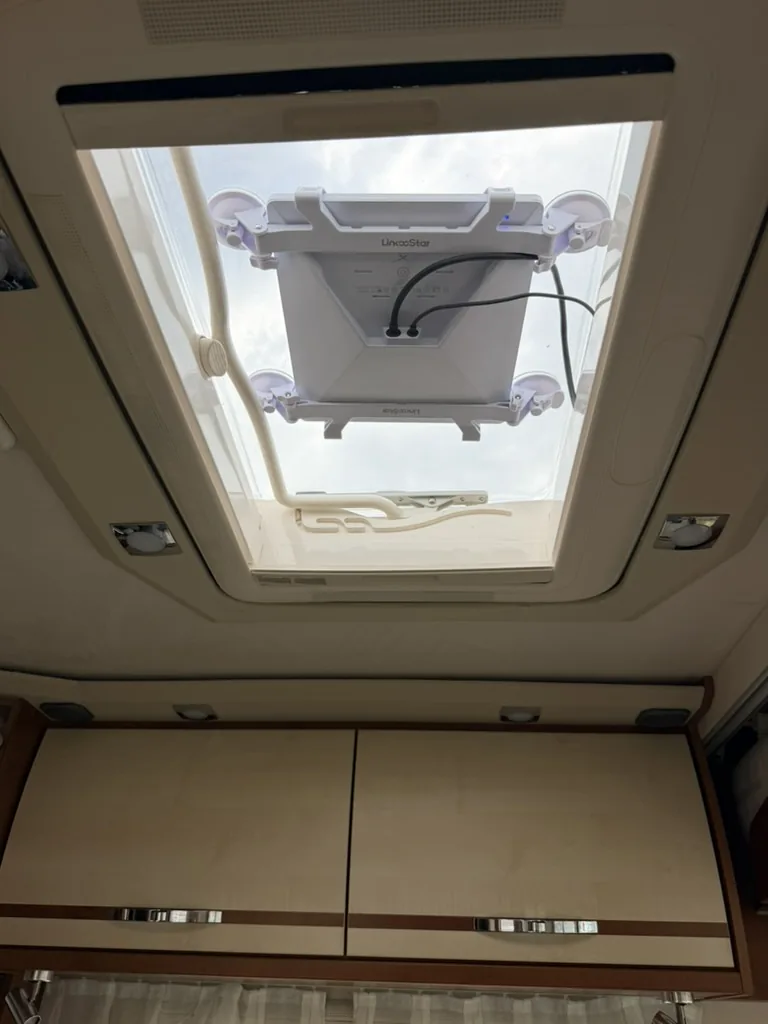
The advantage is that I didn't have to drill any more holes in the roof. The antenna stays in the mount while driving as well and works without trouble — through the roof window it gets enough view of the sky. I use the same position in winter.
For longer stops in summer I have a second option: an external suction-cup mount for the Starlink Mini. That puts the antenna completely outside the vehicle, so it has a clear view of the whole sky with nothing cut off by the window frame. I only use it when parked and standing — it comes off before I set out.
With a satellite connection the view of the sky is what matters most. Trees, surrounding buildings or other obstacles can cause short dropouts — and in the roof-window mount the view is pinched a little more by the frame. That is exactly why automatic failover to the mobile network makes sense: it covers both tunnels and built-up areas while driving, and shading while parked.
Starlink also works without a 230V inverter
I don't have to switch the inverter on for Starlink either. I power it from a 12V vehicle socket through a 100W USB-C Power Delivery adapter.
It's simple and makes better use of the energy than converting twice via 230 V. It also gets rid of the inverter's idle draw, which would otherwise mean running it all day for a single device.
It isn't enough that the adapter says 100 W on it. The whole chain, including the cable and the vehicle socket itself, has to handle the power and the charging profile required. When it's been running for a while I check that the socket, the adapter and the connectors aren't getting excessively warm.
How it works in practice
When I'm parked somewhere open, the internet runs through Starlink as the priority link. If its view of the sky gets blocked, or I drive the motorhome into a tunnel, the router spots the dropout and moves over to T-Mobile. And if T-Mobile doesn't work in that spot either, there's still Vodafone.
As soon as the higher-priority connection comes back, the router switches to it automatically. The whole thing happens without swapping SIM cards or cables by hand.
I didn't want the availability checks to be either too slow or needlessly aggressive. Set the interval long and the router reacts to an outage too late. Make the check too sensitive and it can start hopping between links every time there's a brief wobble.
It's better to treat a link as down only after it fails several checks in a row, rather than the moment it misses one. That keeps the router from bouncing between links at every brief wobble while still reacting quickly enough.
| Link | Priority | When it steps in | Weak point |
|---|---|---|---|
| Starlink | 1 | whenever there's a view of the sky | tunnels, trees, built-up areas |
| SIM 1 — T-Mobile | 2 | when Starlink drops out | weak coverage in some locations |
| SIM 2 — Vodafone | 3 | when T-Mobile doesn't work either | backup, not normally used |
Conclusion
So what I ended up with isn't just a router with a Starlink next to it. It's three connection options that follow on from each other and fill in each other's gaps. Starlink covers places with no usable mobile coverage, T-Mobile takes over when the satellite antenna is blocked, and Vodafone stays in reserve as a second operator for locations where the first mobile network doesn't work.
This combination is the one that makes most sense to me on the road. It doesn't guarantee that the internet will work absolutely everywhere under all conditions. But it considerably reduces the chance that I'll be left without a connection at the moment I actually need one.
Frequently Asked Questions
Why put SIM cards from two different operators in the router?
Two cards on the same network won't help you when that network has poor coverage or an outage in the area — both cards are in exactly the same situation. Cards from two operators give you access to two independent networks. Abroad the benefit is even bigger: Czech operators use different roaming partners, so each card can register with a different local network.
How quickly does the router switch from Starlink to mobile?
It depends on how often the router checks the link and how many failed attempts it takes before the link is marked as down. In my case it comes out at milliseconds — I tested it with a YouTube video playing and the switch from Starlink to SIM 1 was not noticeable at all, even though the public IP address changed in the meantime. The devices are connected to the router's Wi-Fi and take no interest in where the internet comes from; the RUTX50 handles the switching on its own.
Why does the router show 5G when the internet is slow?
The 5G icon and the signal bars only tell you the router has registered with the network — not how good the connection is. Inside a motorhome the metal bodywork also attenuates the signal. What actually helps are the RSRP (signal strength), RSRQ (quality) and above all SINR values, which show the ratio of signal to noise and interference. Low SINR means a slow connection even with full bars.
Do I need to switch on the 230 V inverter for Starlink?
No. Starlink Mini can run from a 12V vehicle socket through a 100W USB-C Power Delivery adapter. That removes the double voltage conversion (12 V → 230 V → back down again) along with the losses and the inverter's idle draw. The condition is that the whole chain, including the cable and the socket itself, can handle the power required.
What is TTL and why does it matter with a mobile router?
TTL (Time To Live) is a value in the IP packet that drops by one every time the packet passes through a router. The different value can tell the network that the traffic isn't coming from the phone itself but from a device behind a router. If the same SIM is faster in a phone than in the router, this may well be the reason. After changing the rule you have to reboot the router and measure the speed several times — a single Speedtest proves nothing.
Curious why I chose Starlink Mini and an industrial Teltonika router rather than a cheaper portable 5G unit? I go through the whole hardware selection, tariffs included, in the article Starlink Mini + Teltonika RUTX50 →